 f0cfdd9fe3
Two cases that can only be answered by reading a prior run, using the pre-turn execution step. Both verified against a live instance. The first: last night's run failed on the HTTP node with a rate limit, and the user says only "it broke again". Nothing about the failure is in the request, so asking the user which node broke or guessing from the workflow's shape both fail. The second is the inverse and the more interesting half — the run SUCCEEDED but the user asserts it failed. Accepting that premise means editing a healthy workflow, which is worse than doing nothing. They are deliberately paired. An agent that always reports success, or always reports failure, passes one and fails the other; only reading the record passes both. Both context claims are anchored at turn end, because the agent learns what happened by calling the executions tool during the turn. Two things the first live run taught, now written into the case: Seeding appends a ` [seed <8hex>]` uniquifier to workflow names, so the name a case authors never matches the name on the instance. Every prior run failed at seed time until the resolver stripped it. The loud refusal earned its keep — the error printed both names side by side and the cause was obvious immediately. Hints steer the failure's nature, not its literal response body. The first version asserted a string from the JSON body the hints asked for; the mock returned an equivalent rate-limit error worded differently, and the assertion failed on a run that was otherwise perfect. It now asserts `failedNode`, a field of the executions debug payload, which cannot come from the workflow definition — so it still proves the record was read, without depending on mock wording. |
||
|---|---|---|
| .agents/skills | ||
| .claude | ||
| .devcontainer | ||
| .github | ||
| .opencode/skills/setup-mcps | ||
| .vscode | ||
| assets | ||
| docker | ||
| docs | ||
| packages | ||
| patches | ||
| scripts | ||
| security | ||
| .actrc | ||
| .aikido | ||
| .boundaries-baseline.json | ||
| .code-health-baseline.json | ||
| .dockerignore | ||
| .editorconfig | ||
| .env.eval.example | ||
| .env.local.example | ||
| .git-blame-ignore-revs | ||
| .gitattributes | ||
| .gitignore | ||
| .npmignore | ||
| .npmrc | ||
| .poutine.yml | ||
| .prettierignore | ||
| .prettierrc.js | ||
| .tbls.postgres.yml | ||
| .tbls.sqlite.yml | ||
| AGENTS.md | ||
| biome.jsonc | ||
| CHANGELOG.md | ||
| CLAUDE.md | ||
| CODE_OF_CONDUCT.md | ||
| codecov.yml | ||
| CONTRIBUTING.md | ||
| CONTRIBUTOR_LICENSE_AGREEMENT.md | ||
| cubic.yaml | ||
| lefthook.yml | ||
| LICENSE_EE.md | ||
| LICENSE.md | ||
| package.json | ||
| pnpm-lock.yaml | ||
| pnpm-workspace.yaml | ||
| README.md | ||
| SECURITY.md | ||
| tsconfig.configs.json | ||
| tsconfig.json | ||
| turbo.json | ||
| vitest.workspace.ts | ||

n8n – The Platform for AI Agents and Workflow Automation
Fair-code platform to build and deploy AI agents and workflows. Combine a visual canvas with custom code, run it self-hosted or in the cloud, and connect to 1500+ integrations. AI automation you can trust with real work, from prototype to production.
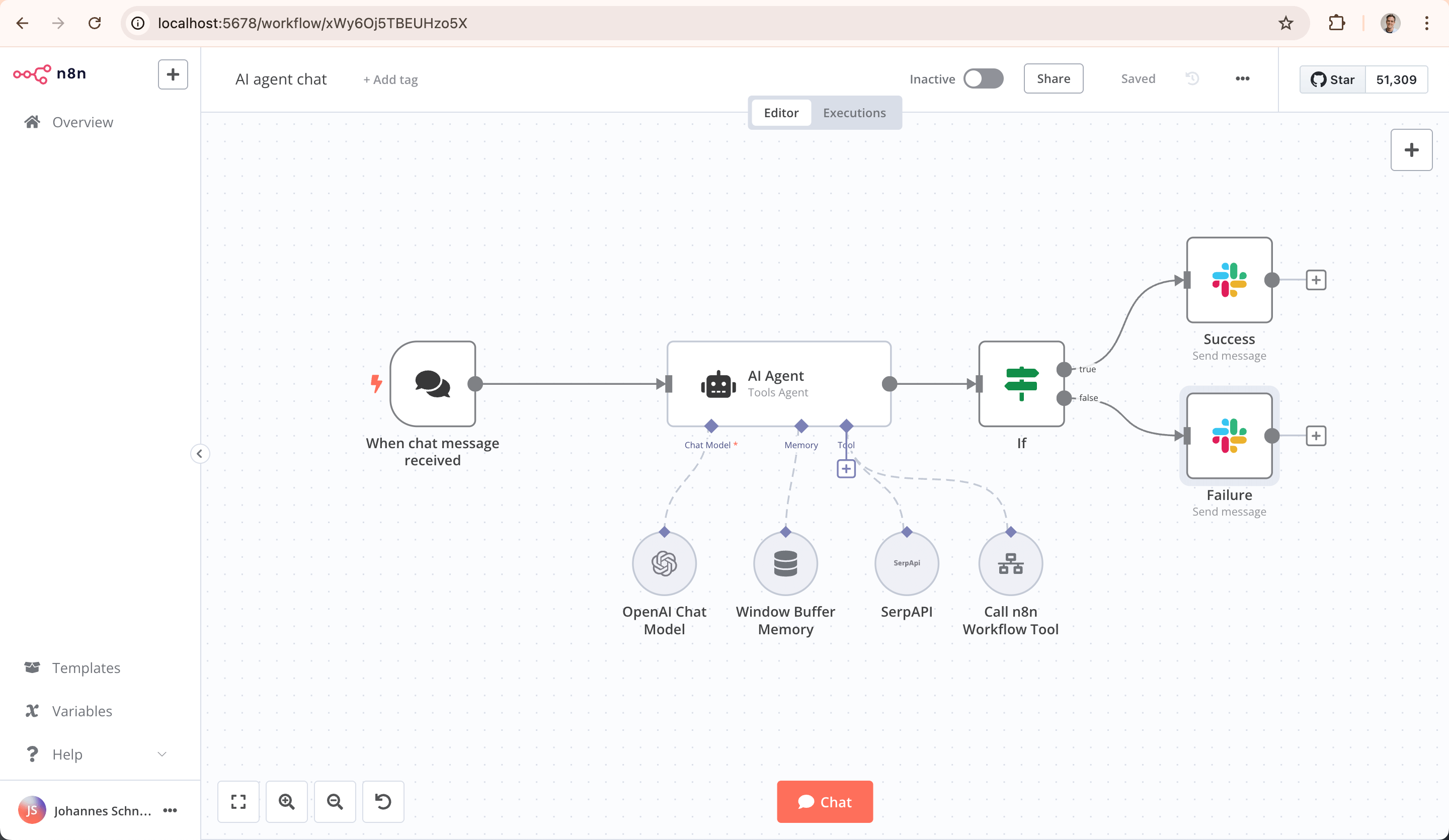
Key Capabilities
- AI-Native Automation Platform: Build and operationalize AI workflows and multi-step agents using your own data, models, and tools
- Model Flexibility, No Lock-In: Connect to OpenAI, Anthropic, Google, or open-source models and switch providers without changing your architecture
- From Prototype to Production: Design multi-step AI workflows with logic, tool use, human approvals, and full observability
- Code When You Need It: Combine visual building with JavaScript, Python, and npm packages for advanced AI workflows
- Enterprise-Ready AI: Self-host or deploy securely with role-based access, audit trails, and support for sensitive data
- Leverage What Already Exists: 1500+ integrations and 9,000+ workflow templates to connect AI with your existing systems
Quick Start
Try n8n instantly with npx (requires Node.js):
npx n8n
Or deploy with Docker:
docker volume create n8n_data
docker run -it --rm --name n8n -p 5678:5678 -v n8n_data:/home/node/.n8n docker.n8n.io/n8nio/n8n
Access the editor at http://localhost:5678
Resources
- 📚 Documentation
- 🔧 1500+ Integrations
- 💡 Example Workflows
- 🤖 AI & LangChain Guide
- 👥 Community Forum
- 📖 Community Tutorials
Support
Need help? Our community forum is the place to get support and connect with other users: community.n8n.io
License
n8n is fair-code distributed under the Sustainable Use License and n8n Enterprise License.
- Source Available: Always visible source code
- Self-Hostable: Deploy anywhere
- Extensible: Add your own nodes and functionality
Enterprise Licenses available for additional features and support.
Additional information about the license model can be found in the docs.
Contributing
Found a bug 🐛 or have a feature idea ✨? Check our Contributing Guide for a setup guide & best practices.
Join the Team
Want to shape the future of automation? Check out our job posts and join our team!
What does n8n mean?
Short answer: It means "nodemation" and is pronounced as n-eight-n.
Long answer: "I get that question quite often (more often than I expected) so I decided it is probably best to answer it here. While looking for a good name for the project with a free domain I realized very quickly that all the good ones I could think of were already taken. So, in the end, I chose nodemation. 'node-' in the sense that it uses a Node-View and that it uses Node.js and '-mation' for 'automation' which is what the project is supposed to help with. However, I did not like how long the name was and I could not imagine writing something that long every time in the CLI. That is when I then ended up on 'n8n'." - Jan Oberhauser, Founder and CEO, n8n.io